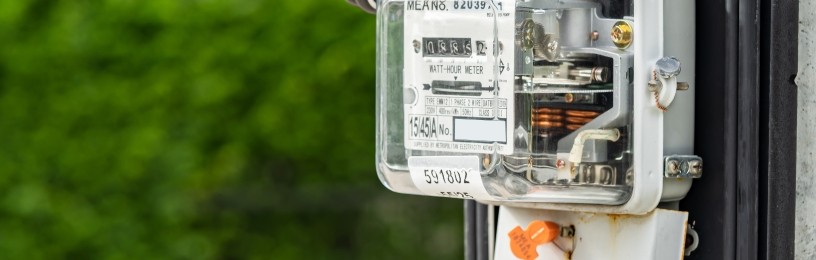
Common electricity, gas and smart meter questions answered
Managing your energy is easier when you know how your meters work.
Whether you have a standard, prepayment or smart meter, we've got the answers to some of the most common questions customers ask about gas and electricity meters.
From finding your meter number and taking readings to topping up a prepayment meter and dealing with supply issues, we'll help you understand what to do and where to find the information you need.
In this guide, we cover
Where to find your MPAN number
Where to find your MPRN number
How to find what type of meter you have
What's a smart meter
What a prepayment meter is and key info about them
How to locate your meter
How to read your meter
Top gas and electricity meter troubleshooting
Power cuts and energy supplier questions
How do I switch suppliers?
What's my electricity meter number?
The MPAN is a unique 13-digit number that identifies an electricity supply point in Great Britain. It is often called a supply number or S-number. You can find this number at the top of the second page of your EDF electricity bill. The MPAN is often shown on bills in a grid format across two rows, like this:
| S | 00 | 0000 | 0 |
| 0000000000000 | |||
What's my gas meter number?
The MPRN is a unique 6- to 11-digit number that identifies the physical gas supply point in Great Britain.
EDF customers can also find this number on the 2nd page of their bill.
MPAN and MPRN numbers can also be found via a customer’s online account, or through the relevant Distribution Network Operator (DNO). Find out who is responsible for yours through the Energy Network Association.
Have a question about energy bills? EDF customers can use our help centre to find helpful info about billing.
What type of meter do I have?
If you know where your meter is and can get to it easily and safely, you can tell what type it is by looking at it.
Electricity meters table
| Meter type | Appearance | Most common UK brands |
|---|---|---|
| Smart meter | Features a digital electronic screen and usually comes with a separate wireless In-Home Display (IHD) unit that shows energy use and costs. |
Offering single-rate and multi-rate smart meters
|
| Single rate meter | Displays a single row of numbers, either via a mechanical rolling counter or a simple digital LCD screen. |
|
| Multi-rate meter (Economy 7 or 10) | Shows two separate rows of numbers (labelled day/normal and night/low) or a digital screen where you must press a button to toggle between different rate registers |
|
| Dial meter | Uses a series of small, clock-like dials with needles pointing to numbers from 0 to 9 rather than showing a direct numeric readout. |
|
| Prepayment meter | Includes a keypad, card slot, or key fob area to top up credit. |
|
Gas meters table
| Type of gas meter | Appearance | Most common brands |
|---|---|---|
| Smart meter | Features a digital electronic screen and usually comes with a separate wireless In-Home Display (IHD) unit that shows energy use and costs. |
|
| Metric diaphragm meters | Usually large, boxy, and enclosed in white, grey, or cream steel or heavy plastic. They feature a prominent glass or plastic window revealing a mechanical rolling display. |
|
| Imperial diaphragm | The mechanical rolling display shows 4 primary numbers in black. They often feature a single, large red test dial with a pointer needle to the right of the rolling numbers. |
|
| Dial meters | Uses a series of small, clock-like dials with needles pointing to numbers from 0 to 9 rather than showing a direct numeric readout. |
|
What's a smart meter?
Smart meters are an upgrade to old gas and electricity meters. It’s a digital device that automatically tracks how much gas and electricity your home uses and sends the readings wirelessly to your energy supplier.
Do smart meters need wifi or internet?
Smart meters don’t rely on the internet to send data, so they don’t need an internet connection or wifi to work.
How do smart meters send readings?
Smart meters use a secure network managed by the Data Communications Company (DCC) to share information with in-home displays and energy suppliers.
How do I know if I have a smart meter?
Smart meters usually come with an in-home display that plugs directly into the wall. This device shows how much gas and electricity you use. Some suppliers also offer free tools like our Energy Hub, a free tool that breaks down your energy use in kilowatt-hours and pounds by hour, day, week, and month. It shows where you use the most energy at home, helping you spot savings easily.
If you don't have an in-home device, you can use the Citizens Advice smart meter checker, which is a free tool.
Checking your electricity meter is smart
You can also check your meter if it’s safe to do so. If the meter has a device attached with lights labelled WAN or HAN, it means you have a smart electric meter.
How do I get a smart meter?
Contact your energy supplier, who should be able to help you install a smart meter. Some companies offer a free booking service where you can choose a time and date convenient to you to get a smart meter installed. Read our smart meter installation guide so you know what to expect. To apply for a smart meter installation, contact your energy company.
Find out more about smart meters. EDF customers can book a smart meter installation online through their energy account. Log in to book your smart meter appointment.
What's a prepayment meter?
A prepayment meter allows you to pay for your energy before using it. You can easily top up a key or smart card at shops displaying Payzone or PayPoint signs. Just insert your card or key into the meter to add credit instantly. If you want to switch to a different type of meter, contact your energy provider.
Where and how do I top up my prepayment meter?
You can top up at any shop or Post Office with the Payzone or PayPoint signs. Look out for shops with the sign in their windows. Many small, local shops can do this for you, as can convenience stores like Tesco Local.
Some energy suppliers now let you top up online or via the phone – check with your energy provider to see what they offer.
What happens if I forget to top up before a bank holiday?
Prepayment electricity meters have something called 'friendly non-disconnection hours'. If your electricity meter has this non-disconnection function, you won't get cut off if you run out of credit during these times:
- Monday to Friday 6pm to 11am
- Anytime on weekends and Bank Holidays, until 11am the next working day
Unfortunately, traditional gas prepayment meters don't have friendly non-disconnection hours. That's why it's important to get your gas meter ready for the holidays:
Get topped up before you go – make sure you've topped up with enough credit to cover the standing charges and debt repayments you'll need to pay while you're away
Know what happens if you've not used gas for a while – you carry on paying standing charges and debt repayments, even when you're not using gas; if you run out of credit, these payments will build up as debt and will come off your next top-up
Be aware of what to do if you can't top up – see below to find out about reconnection, emergency credit, a lost or damaged top-up key or card, and how to get in touch.
Where is my gas or electricity meter located?
If you can’t see your meter inside your property, try looking outside instead. You're looking for the meter box, which is usually white. If you live in a flat or an apartment, you might find your meter on the ground floor.
Each meter should have a label with your flat number. If not, contact your landlord, who can tell you where it is. If you have a bill, match the serial number to the one on the meter. If you're a homeowner and can't find the meter, get in touch with your property agent or energy supplier.
How do I take a meter reading?
Taking a meter reading is usually simple. You need to note the first five figures shown left to right, ignoring any numbers in red and any numbers after the decimal point (sometimes in red). Some meters can be a little complicated. If you're having issues, our support section on reading your meter will help.
View our videos to help you read your meters
| Meter type | Video |
|---|---|
| Dial meter |
|
| Digital meter |
|
| Two-rate meter |
|
If you have a smart meter, you don't always need to take readings because smart meters, which are connected to your supplier, send readings automatically.
How often should I submit readings? Every month, or at least every three months, if you don't have a smart meter. Other key times to read your meter are when you change tariff, when the price cap changes and also when you move home.
Gas and Electricity meter troubleshooting
Why is my electricity meter flashing red?
A flashing red light on your meter is completely normal. In fact, the light shows that energy is being used – and sometimes, it will flash faster if there is more energy being used.
Why is my meter blank?
Meters can go into sleep mode and seem to have no display. Pressing a button on the main panel should bring the display back.
If you're worried your meter is broken, don't try to fix it yourself; contact your energy provider, and they'll tell you what to do.
What to do if I smell gas
- Don't smoke, light matches, or use any naked flames
- Avoid touching electrical switches, as turning lights on or off could cause a spark
- Ventilate the area by opening doors and windows
- Find your gas safety shut-off valve. It's usually right next to your meter, with a red or yellow handle. Turn it to a right angle (90 degrees) against the pipe to cut off the gas, unless the meter is located in a cellar
- Evacuate the building and stay at a safe distance while calling the National Gas Emergency Service
Why is my electricity not working?
There could be several reasons why your power is out. Here are top issues and solutions:
Power cuts and supplier questions
What should I do during a power cut?
Power cuts can happen suddenly due to bad weather, damage, or maintenance. Most are fixed quickly, but it's good to know how to stay safe.
First, check if only your home is affected. See if your neighbours have power and look at your fuse box to see if a switch tripped.
If your area is affected, call 105 or your local electricity company for updates. They fix outages. Find more info on the Power Cut? 105 website.
Keep a torch somewhere easy to reach, charge your phone and power bank, and know where to find important numbers in case you can't go online. People on the Priority Services Register, like the elderly, disabled, or those with medical equipment, can get extra help. For tips on preparing for and staying safe during a power cut, visit our power cut guide.
How do I switch energy providers?
Switching energy suppliers is easier than you may think. There are two ways you can switch:
- If you've already decided which supplier you want to switch to. In this case, contact the new supplier and tell them you want to join on the tariff you’ve chosen. You’ll need your postcode, name of current supplier and tariff, plus your bank details if you want to pay by Direct Debit. The new supplier will handle everything else, including contacting your current supplier
- If you're not sure which supplier would be better, you can go through the whole process on a comparison website. You’ll need details of your current tariff, supplier and postcode so you can compare suppliers and tariffs. The website will switch your energy supplier for you
Have more questions about switching? Not to worry – we’re here with the answers. Read more on how to switch energy providers now.
Looking for a more suitable tariff?
Understanding your gas and electricity meters is a great first step towards taking control of your energy use. The next step is making sure you're on a tariff that suits your home and lifestyle.
When you choose EDF, you'll benefit from:
- Access to a range of tariffs, including options for electric vehicle drivers, solar panel owners and battery storage systems
- Easy account management through MyAccount and our App, where you can track your energy use, submit meter readings and manage your account online
- Support to help make your home more energy efficient, from insulation and heating advice to low-carbon technologies such as air source heat pumps
- The confidence of being with one of the UK's largest and most established energy suppliers
- Electricity backed by Britain's biggest generator of zero-carbon electricity(1)
Whether you're looking for a new tariff, considering a smart meter, or exploring ways to make your home more energy efficient, we're here to help.
Explore EDF tariffs and see what's available
Get a quote today
Related articles

Are electric blankets expensive to run?

What is the average energy bill in the UK?
