How to protect yourself from fraud
We take fraud and crime seriously and want to help you stay safe. Read our guide on how to spot a scam, how to protect yourself and what to do if you're a victim of a scam.
Keep yourself safe from fraud
Criminals are always coming up with new ways to trick people into parting with their personal details and cash.
They will sometimes pretend to be EDF, and can target you by email, phone and text or at your door.
The best way to protect yourself is to know what to look out for, so you can think before you act!
How to report fraud
It's important to report fraud as soon as you can, so you can get the help you need.
- Report fraud in England or Wales to Report Fraud
- Report fraud in Scotland to Police Scotland by calling 101
Want to block spam messages?
Forward scam texts or mobile calls to Ofcom's 7726 service. Your mobile provider will then investigate nuisance numbers, and potentially block them.
Energy scams to watch out for
Find out how to protect youself from scam emails, calls, messages and visits.
Scam emails
What is a phishing email?
Fraudsters send phishing emails to trick you into giving out sensitive personal information with criminal intent.
These emails are designed to look like they're from a legitimate source and trick you into handing over personal information like your username, password, credit card number, or bank account details or to make a payment.
What do you do if you've had a suspect email that claims to be from us?
❌ Don't click any links in the email
❌ Don't open the attachments
❌ Don't reply to the email
✓ Forward the email to us at phishing@edfenergy.com (if you can, send the original email to us as an attachment)
How to spot a phishing email
1. Be aware of phishing
Criminals will make their emails look like it comes from a legitimate company, to try to trick you into giving personal details or open malware.
2. Check the email address
- Is the email from a trusted email domain (e.g. edfenergy.com) or from a suspicious free email service like @gmail or @hotmail?
- Is the company name spelt correctly, or are there any misspellings (e.g. edfenergyy)
3. Check the subject line of the email before you open it
Look at the line of text that tells you what the email is about before you open it – does it look right? Don't open the email if it:
- Demands personal information
- Threatens consequences if you don't take action
4. Check the greeting
- Be suspicious if the email starts with 'Dear customer' or 'Dear [your email address]' – it's a strong sign that the email might not be genuine
- Be careful even if the email starts with Dear [your name] – criminals can get your personal details
5. Check the content of the email
- Don't respond to the email if you're uncomfortable with what it's asking you to do
- Be suspicious if the email contains lots of spelling mistakes, grammatical errors and typos
How to know if an email is from EDF
You should check the email address if you're suspicious about an email. We'll never send you an email from a free email service like @gmail.com or @hotmail.com – and all our email addresses end with:
- @edfenergy.com
- @email.edfenergy.com
- @securepay.edfenergy.com
- @securepayment.edfenergy.com
- @digitalemail.edfenergy.com
You can also protect yourself from email fraud by signing up to MyAccount. You'll find all the emails we've sent you under 'Email history' in the main menu.
Scam calls
How to know if EDF is calling you
We may need to call you occasionally to discuss your energy account. We'll always identify ourselves and will ask you a couple of security questions to verify we're speaking to the right person.
You can check your call is from us in two ways:
- Look at the phone numbers we use to call our customers – we don't call from any other number
- Get in touch with us if you're suspicious about a call – we'll tell you if it's genuine
Scam messages
How to know if a text or WhatsApp message is from EDF
We may text you to remind you about meter readings or payments or to let you know about our latest offers. You can also start a conversation with us by text.
We only use the following numbers to get in touch:
- Text – 0748 058 9950 or 07481 341 928
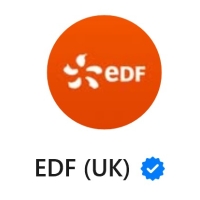
You'll always see the EDF logo with a blue tick at the top of any WhatsApp message thread with us.
Scam visits
How to know if EDF is visiting your home
You can expect a home visit from EDF or someone working on our behalf to read, fix or install a meter – or to collect an outstanding payment. You can always check your visitor is genuine by getting in touch.
To check your meter reading visit is genuine, call our meter reading service partner, Morrisons Data Services (MDS), on 0191 201 3791.
For any other visit, please get in touch with us.
How to add extra security to home visits
You can ask any visitor from EDF to use a password before they enter your home. Here's how to join our password security scheme:
- Go to our Priority Services Register
- Give us your details, then head straight to question 4: "Would you like to join our password scheme?"
- Click 'Yes, I'd like to join the password scheme' and enter your password
- How to spot a fraudster selling energy at your door
Do not buy energy from anyone at your door
We never sell energy at your doorstep. But fraudsters posing as EDF might knock on your door with an offer that's too good to be true.
They might offer you discounted prepaid energy, or the chance to clear the balance on your energy account for a small payment.
Are you struggling to pay? Please find out how we can help – fraud is not the answer.
Discounted prepaid energy
It is illegal to sell prepayment credit on the doorstep.
Anyone offering you discounted prepaid energy on your doorstep is a fraud. You're at risk of losing money if you buy from them.
Your energy supplier will know if you're using illegal credit – and you'll end up paying twice. Once to the doorstop seller, and again to the energy supplier.
Paying a fee to clear your balance
Criminals might offer to pay off the balance on your energy account in return for a small payment.
This is a scam that will lose you money. You could also be investigated for fraud.
The criminal will probably use a stolen credit card to pay off your balance. As soon as the theft is reported, the bank will reverse the payment – and you'll have to pay the full original balance on your energy account.
Watch out for Winter Fuel Payment scams
Every pensioner in England and Wales will automatically get a Winter Fuel payment from the government. You do not need to do anything to get this payment – it's all done automatically.
Any text or WhatsApp message asking you to take action to get your Winter Fuel is a scam – probably to get sensitive personal information from you. So please stay safe: do not reply to these messages and do not click on any links.
If you earn over £35,000, HMRC will automatically recover your payment through Pay As You Earn or self-assessment tax return.
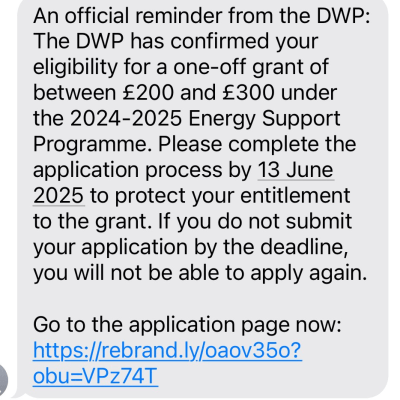
What a scam text might say
An official reminder from the DWP: The DWP has confirmed your eligibility for a one-off grant of between £200 and £300 under the 2024-2025 Energy Support Programme. Please complete the application process by [date] to protect your entitlement to the grant. If you do not submit your appliaction by the deadline, you will not be able to apply again. Go to the application page now: https//url
What a scam text might look like
Scam emails
Fraudsters send phishing emails to trick you into giving out sensitive personal information with criminal intent.
These emails are designed to look like they're from a legitimate source to dupe you into handing over personal information like your username, password, credit card number or bank account details – or to make a payment.
To always be sure the email is from us, make sure you've signed up to MyAccount. You'll see all the emails we've sent you under 'Email history' in the main menu.
How to stay safe from scam emails
How to spot a phishing email
1. Be aware of phishing
Criminals will make their emails look like they come from a legitimate company, to try to trick you into giving personal details or open malware.
2. Check the email address
Check the email is from a trusted email domain (e.g. edfenergy.com) – with no misspellings (e.g. edfenergyy). And be wary of company emails from free email services like @gmail or @hotmailcompany.
3. Check the subject line of the email before you open it
Look at the line of text that tells you what the email is about before you open it – does it look right? Do not open the email if it demands personal information or threatens consequences.
4. Check the greeting
Be suspicious if the email starts with 'Dear customer' or 'Dear [your email address]' – it's a strong sign that the email might not be genuine. Even if the email starts with Dear [your name] you should be careful: criminals can get your personal details.
5. Check the content of the email
Do not respond to the email if you're uncomfortable with what it's asking you to do. And be supsicious if the email contains lots of spelling mistakes, grammatical errors and typos.
How you know an email is from us
You should check the email address if you're suspicious about an email. We'll never send you an email from a free email service like @gmail.com or @hotmail.com – and all our email addresses end with either:
- @edfenergy.com
- @email.edfenergy.com
- @securepay.edfenergy.com
- @securepayment.edfenergy.com
- @digitalemail.edfenergy.com
- @hello@info.edfenergy.com
- @business.edfenergy.com
You can also protect yourself from email fraud by signing up to MyAccount. You'll find all the emails we've sent you under 'Email history' in the main menu.
What to do if you get an EDF scam email
❌ Do not click any links in the email
❌ Do not open the attachments
❌ Do not reply to the email
✓ Forward the email to us at phishing@edfenergy.com (if you can, send the original email to us as an attachment)
✓ Report it to the National Cyber Security Centre
Scam calls
If we ever call you to discuss your energy account, we'll always start with a couple of security questions. This helps us make sure we're speaking to the right person.
To stay safe from fraudsters posing as us, you can check the number is genuine. You can do this in one of two ways:
- Look at the list of phone numbers we use to call our customers – we don't call from any other number
- Hang up and get back in touch with us – we'll let you know if the call was genuine. Don't call back straight away. Give it a bit of time to make sure that the scammers are not still on the line
Scam messages
We often send text messages to remind our customers about meter readings and payments – or to let them know about our latest offers. Our customers can also start a text conversation with us.
To stay safe from fraudsters posing as us, you can check that the number is genuine. We only use the following numbers to get in touch:
- Text – 0748 058 9950
Scam visits
We sometimes visit customers' homes to read, fix or install a meter – or to collect an outstanding payment. Another company might also come out on our behalf. We never sell energy at the door.
But we also know fraudsters can show up at your door, pretending to be visiting from EDF. Please remember that offers that seem too good to be true might put you at risk.
How to stay safe from scam visits
Check your visitor is genuine
Meter reading visit
Call 0191 201 3791 to check you meter reading visit is genuine. This will take you through to our meter reading service partner Morrisons Data Services (MDS).
Any other type of visit
Please get in touch and one of our energy specialists will help you out.
Add extra security to home visits
You can ask any visitor from EDF for a password before they enter your home. Here's how to join our password security scheme:
- Go to our Priority Services Register
- Give us your details then head straight to question 4: "Would you like to join our password scheme?"
- Click 'Yes, I'd like to join the password scheme' and enter your password
Do not buy energy at your door
Please do not be tempted to buy energy or pay a fee to clear your balance at your door. These offers are always too good to be true, and put you at risk of losing more money.
If you're struggling to pay your energy bills, please find out how we can help. Fraud is not the answer.
Discounted prepaid energy
It is illegal to sell prepayment credit on the doorstep.
Anyone offering you discounted prepaid energy on your doorstep is a fraud. You're at risk of losing money if you buy from them.
Your energy supplier will know if you're using illegal credit – and you'll end up paying twice. Once to the doorstop seller, and again to the energy supplier.
Do not pay a fee to clear your balance
Criminals might offer to pay off the balance on your energy account in return for a small payment.
This is a scam that will lose you money. You could also be investigated for fraud.
The criminal will probably use a stolen credit card to pay off your balance. As soon as the theft is reported, the bank will reverse the payment – and you'll have to pay the full original balance on your energy account.
Winter fuel payment scams
Every pensioner in England and Wales will automatically get a Winter Fuel payment from the government. You will not need to do anything to get this payment – it's all done automatically.
Any text or WhatsApp message asking you to take action to get your Winter Fuel is a scam – probably to get sensitive personal information from you. So please stay safe: do not reply to these messages and do not click on any links.
If you earn over £35,000, HMRC will automatically recover your payment through Pay As You Earn or self-assessment tax return.
What a scam text might say
An official reminder from the DWP: The DWP has confirmed your eligibility for a one-off grant of between £200 and £300 under the 2024-2025 Energy Support Programme. Please complete the application process by [date] to protect your entitlement to the grant. If you do not submit your appliaction by the deadline, you will not be able to apply again. Go to the application page now: https//url
What a scam text might look like
Scam emails
Fraudsters send phishing emails to trick you into giving out sensitive personal information with criminal intent.
These emails are designed to look like they're from a legitimate source to dupe you into handing over personal information like your username, password, credit card number or bank account details – or to make a payment.
To always be sure the email is from us, make sure you've signed up to MyAccount. You'll see all the emails we've sent you under 'Email history' in the main menu.
How to spot scam emails
1. Be aware of phishing
Criminals will make their emails look like they comes from a legitimate company, to try to trick you into giving personal details or open malware.
2. Check the email address
Check the email is from a trusted email domain (e.g. edfenergy.com) – with no misspellings (e.g. edfenergyy). And be wary of company emails from free email services like @gmail or @hotmailcompany.
3. Check the subject line of the email before you open it
Look at the line of text that tells you what the email is about before you open it – does it look right? Do not open the email if it demands personal information or threatens consequences.
4. Check the greeting
Be suspicious if the email starts with 'Dear customer' or 'Dear [your email address]' – it's a strong sign that the email might not be genuine. Even if the email starts with Dear [your name] you should be careful: criminals can get your personal details.
5. Check the content of the email
Do not respond to the email if you're uncomfortable with what it's asking you to do. And be supsicious if the email contains lots of spelling mistakes, grammatical errors and typos.
What to do if you suspect an EDF email is a scam
If you suspect an email might be a scam, you shoud take the following steps:
1. Check the email is from us
We'll never send you an email from a free email service like @gmail.com or @hotmail.com – all our email addresses end with either:
- @edfenergy.com
- @email.edfenergy.com
- @securepay.edfenergy.com
- @securepayment.edfenergy.com
- @digitalemail.edfenergy.com
2. Keep yourself safe
❌ Do not click any links in the email
❌ Do not open the attachments
❌ Do not reply to the email
✓ Forward the email to us at phishing@edfenergy.com (if you can, send the original email to us as an attachment)
Scam calls
If we ever call you to discuss your energy account, we'll always start with a couple of security questions. This helps us make sure we're speaking to the right person.
To stay safe from fraudsters posing as us, you can check the number is genuine. You can do this in one of two ways:
- Look at the list of phone numbers we use to call our customers – we don't call from any other number
- Hang up and get back in touch with us – we'll let you know if the call was genuine. Give it a few minutes before you call just to make sure they are no longer on the line
Scam messages
We often send text messages to remind our customers about meter readings and payments – or to let them know about our latest offers. Our customers can also start a text conversation with us.
To stay safe from fraudsters posing as us, you can check the number is genuine. We only use the following numbers to get in touch:
- Text – 0748 058 9950
Scam visits
We sometimes visit customers' homes to read, fix or install a meter – or to collect an outstanding payment. Another company might also come out on our behalf. We never sell energy at the door.
But we also know fraudsters can show up at your door, pretending to be visiting from EDF. Please remember that offers that seem too good to be true might put you at risk.
How to stay safe from scam visits
Before you let any visitor claiming to be from EDF into your home, you can check they are genuine.
Meter reading visit
Call 0191 201 3791 to check you meter reading visit is genuine. This will take you through to our meter reading service partner Morrisons Data Services (MDS).
Any other type of visit
Please get in touch and one of our energy specialists will help you out.
Add extra security to home visits
You can ask any visitor from EDF for a password before they enter your home.
Here's how to join our password security scheme:
- Go to our Priority Services Register
- Give us your details then head straight to question 4: "Would you like to join our password scheme?"
- Click 'Yes, I'd like to join the password scheme' and enter your password
Scams to sell energy at your door
Please do not be tempted to buy energy or pay a fee to clear your balance at your door. These offers are always too good to be true, and put you at risk of losing more money.
If you're struggling to pay your energy bills, please find out how we can help. Fraud is not the answer.
Discounted prepaid energy scams
It is illegal to sell prepayment credit on the doorstep.
Anyone offering you discounted prepaid energy on your doorstep is a fraud. You're at risk of losing money if you buy from them.
Your energy supplier will know if you're using illegal credit – and you'll end up paying twice. Once to the doorstop seller, and again to the energy supplier.
Fees to clear your balance scams
Criminals might offer to pay off the balance on your energy account in return for a small payment.
This is a scam that will lose you money. You could also be investigated for fraud.
The criminal will probably use a stolen credit card to pay off your balance. As soon as the theft is reported, the bank will reverse the payment – and you'll have to pay the full original balance on your energy account.
Winter fuel payment scams
Every pensioner in England and Wales will automatically get a Winter Fuel payment from the government. You will not need to do anything to get this payment – it's all done automatically.
Any text message or Whatsapp message asking you to take action to get your Winter Fuel is a scam – probably to get sensitive personal information from you. So please stay safe: do not reply to these messages and do not click on any links.
If you earn over £35,000, HMRC will automatically recover your payment through Pay As You Earn or self-assessment tax return.
What a scam text might say
An official reminder from the DWP: The DWP has confirmed your eligibility for a one-off grant of between £200 and £300 under the 2024-2025 Energy Support Programme. Please complete the application process by [date] to protect your entitlement to the grant. If you do not submit your appliaction by the deadline, you will not be able to apply again. Go to the application page now: https//url
What a scam text might look like