How to change your kVA with your DNO
To change your kVA (either increase or decrease) you need to contact your DNO with the following information:
| MPAN* | Site Address | Current ASC (kVA) | New ASC (kVA) |
|---|---|---|---|
| 1023456789012 | 1 Example road | 1200 | 1080 |
*This can be found on your supply bill and is sometimes referred to as a SPAN.
It may appear like this on your supply bill. The MPAN is the 13 digit number along the bottom line.
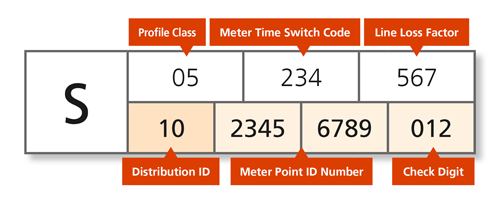
The DNO you contact will vary depending on the MPAN you want to contact them about. You can find the full list below. Use the first 2 digits of your MPAN to establish which DNO:
Please copy in bureau@tec.ac.uk to your email, so TEC can update their records to allow for their bill validation service to run smoothly.
| MPAN (first 2 digits) | Company | |
|---|---|---|
| 10 | UK Power Networks | connection.agreements@ukpowernetworks.co.uk |
| 11 | National Grid | nged.connectionspolicy@nationalgrid.co.uk |
| 12 | UK Power Networks | connection.agreements@ukpowernetworks.co.uk |
| 13 | Scottish Power | mpas.operations@scottishpower.com |
| 14 | National Grid | nged.connectionspolicy@nationalgrid.co.uk |
| 15 | NEDL/YEDL | connection.records@ce-electricuk.com |
| 16 | Electricity North West | connectionsdelivery@enwl.co.uk |
| 17 | Scottish and Southern | authorised.capacity@scottish-southern.co.uk |
| 18 | Scottish Power | mpas.operations@scottishpower.com |
| 19 | UK Power Networks | connection.agreements@ukpowernetworks.co.uk |
| 20 | Scottish and Southern | authorised.capacity@scottish-southern.co.uk |
| 21 | National Grid | nged.connectionspolicy@nationalgrid.co.uk |
| 22 | National Grid | nged.connectionspolicy@nationalgrid.co.uk |
| 23 | Yorkshire - Northern Powergrid | connection.records@northernpowergroup.com |
| 24 | GTC | enquiries@envoyonline.co.uk |
| 25 | Laing | MPAS@ESPUG.com |
| 26 | Energetics | hello@energetics-uk.com |
| 27 | GTC | mpan.requests@gtc-uk.co.uk |
Related articles

July 15, 2026
UK electricity demand: why it matters for business competitiveness and what must change
As electricity demand grows across industry, transport and digital infrastructure, it is becoming a key factor in UK business competitiveness. In this article, EDF explores why electrification matters for growth, how pricing signals influence investment decisions, and what must change to build An Electric Britain.

February 05, 2026
EDF power solutions UK secures solar CPPA’s with BAE Systems and NatWest

April 10, 2025